



 Dec 14.2025
By adopting the right combination of workflow automation tools and AI scheduling assistants, virtual assistants can elevate their operational efficiency and enhance client satisfaction, while freeing up valuable time for higher-level strategic responsibilities. The following sections will guide you step-by-step through selecting, implementing, and optimizing these solutions for maximum impact.

Effective management of multiple client calendars through AI-assisted scheduling tools.
In the fast-paced and ever-evolving landscape of remote work, automation has become essential for virtual assistants aiming to maximize efficiency and deliver consistently high client value. Understanding the main categories of workflow automation tools creates a strong foundation for selecting the right solutions tailored to your workflow needs.
Integration platforms such as Zapier, Make, and n8n act as the backbone, enabling you to connect disparate applications seamlessly and automate repetitive tasks without writing code. For example, a virtual assistant can set up a Zapier automation to instantly sync data from client forms into Google Sheets, update contact records in a CRM, and trigger email notifications—eliminating manual data entry and reducing errors. The choice between cloud-hosted platforms like Zapier versus self-hosted tools like n8n depends on whether ease of use or data privacy is your priority.
Email automation tools such as Mailshake and Saleshandy excel in automating personalized follow-up sequences that nurture leads, renew contracts, or respond proactively to client inquiries. These platforms use dynamic variables—like client names and company information—to keep communication personalized while scaling outreach efforts, crucial for freelancers managing multiple clients efficiently.
AI-powered scheduling assistants, including Calendly and Motion, are revolutionizing calendar management by automating client bookings, intelligently handling conflicts, and managing multiple calendars. This not only saves valuable time but reduces scheduling errors, a frequent challenge when working with clients across different time zones.
Project management tools like Trello, Asana, and ClickUp extend these automation capabilities by generating task checklists and delegating responsibilities triggered by CRM updates or incoming emails. With such integrations, virtual assistants gain a real-time, comprehensive overview of projects, deadlines, and client statuses—dramatically enhancing productivity and accountability.
Mastering these categories is fundamental for virtual assistants who want to be future-ready in 2026 and beyond. Next, we will dive into the top workflow automation platforms, providing detailed feature comparisons to help you identify the best tools aligned with your unique virtual assistant needs.
Choosing the most suitable automation tools requires an in-depth understanding of each platform’s strengths and how they integrate with your workflow. Among no-code options, Zapier stands out as the industry leader, connecting thousands of apps with an intuitive visual editor suited for both simple and complex multi-step automations.
Make (formerly Integromat) offers more advanced workflow customization, including branching logic with routers, filters, and iterators—ideal for virtual assistants managing intricate data flows or multi-client projects needing granular automation control.
For those with technical skills prioritizing data privacy, n8n presents an open-source, self-hosted option that removes vendor limits on data handling and customization. While it requires some setup and ongoing server management, n8n empowers freelancers to build tailored workflows that align perfectly with their client confidentiality requirements.
When it comes to email automation, Mailshake and Saleshandy specialize in personalized follow-up sequences backed by robust analytics tracking open rates, replies, and campaign performance, enabling continuous optimization of outreach efforts.
For scheduling, Calendly offers simplicity and reliability, facilitating easy one-on-one or group bookings with smart timezone handling. Motion enhances this by employing AI to dynamically optimize daily agendas, adjusting priorities and time blocks to maximize productivity.
Understanding these tools equips virtual assistants and freelancers to craft workflows that dramatically reduce manual effort and elevate client engagement. The following sections will provide actionable automation templates specifically designed for common VA tasks, ensuring you can confidently implement these tools seamlessly into your routine.

No-code integration platforms enabling seamless workflow automation for virtual assistants.
Implementing automation is most effective when guided by clear, practical templates that reflect common virtual assistant tasks. For instance, an email follow-up sequence in Saleshandy begins by securely connecting your Gmail or Outlook account, then importing client contacts directly from your CRM system.
Next, create a three-step personalized sequence embedding dynamic fields such as client name, company, and last interaction date to maintain a genuine tone while automating outreach. Scheduling follow-ups every three days strikes a balance between persistence and consideration. Utilizing the platform’s analytics dashboard allows you to monitor opens, clicks, and replies, enabling real-time message fine-tuning that significantly improves engagement rates.
To streamline scheduling, integrating Calendly with Zapier creates a powerful workflow: once a client books a time slot in Calendly, Zapier triggers confirmation emails, updates all relevant calendars automatically, and syncs appointment details back to your CRM. Calendly’s time zone detection eliminates common booking errors when working internationally, making this setup indispensable for virtual assistants handling diverse client bases.
These templates not only save time but also foster confidence in adopting automation by simplifying the transition from manual to optimized workflows. The next section will compare no-code SaaS platforms versus self-hosted automation solutions, helping you make informed decisions based on your technical expertise and business demands.
The decision between no-code SaaS platforms and self-hosted tools is pivotal for shaping your automation approach. No-code SaaS platforms like Zapier and Make offer rapid deployment, minimal maintenance, and extensive app ecosystems. They suit virtual assistants seeking a plug-and-play solution with dependable customer support and security compliance certifications, reducing worries around data protection.
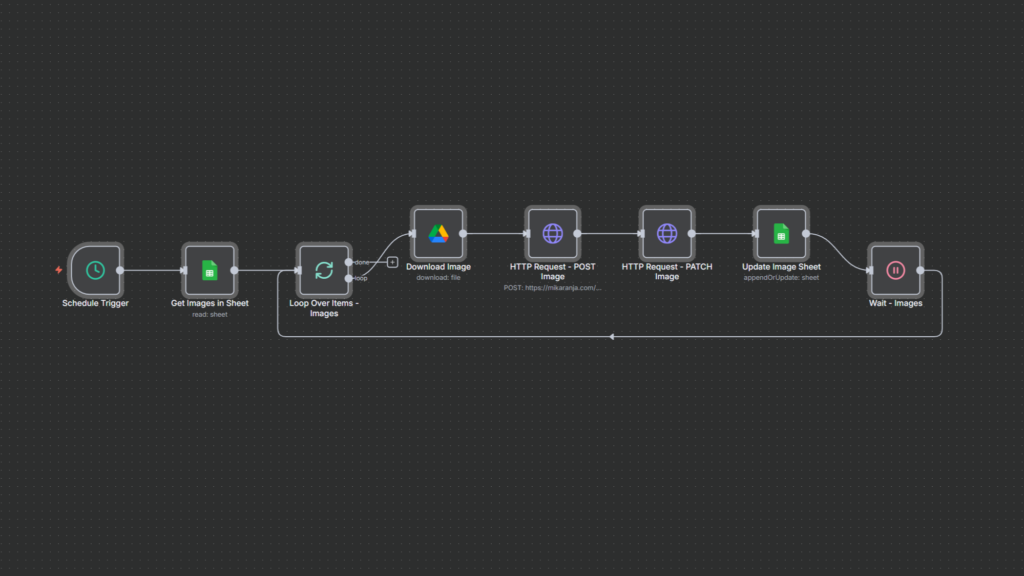
Automated n8n workflow for downloading images, uploading them to a website, and updating Google Sheets records.
Conversely, self-hosted solutions such as n8n provide unparalleled control over data privacy and workflow customization. This is particularly important when managing sensitive client data or adhering to regulations such as GDPR and HIPAA. However, self-hosted tools require technical know-how for server setup, maintenance, and troubleshooting, plus a commitment to ongoing updates and security management.
Regardless of the choice, rigorously evaluate each platform’s security features, including data encryption, role-based access controls, and compliance certifications. Prioritizing these aspects not only protects confidential client information but also enhances your professional credibility—a critical freelance asset in today’s remote work landscape.
With this infrastructure in place, integrating automation tools with your CRM completes the core setup for centralized client management and deep workflow synchronization, covered in the next section.
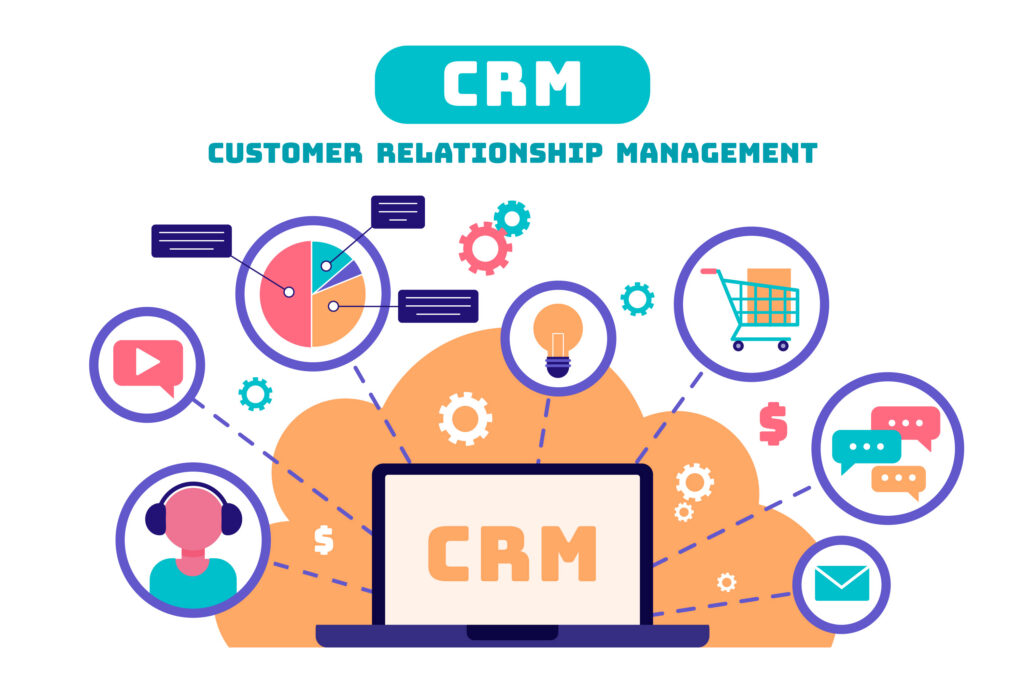
Visual representation of CRM tools used to manage customer interactions, analytics, sales, and communication.
Integrating your automation workflows with a CRM system is a game-changer, centralizing client data and connecting communication across multiple platforms. By eliminating duplicate data entry, you reduce errors and free valuable time for higher-impact activities.
Popular CRMs like HubSpot, Zoho CRM, and Salesforce integrate effortlessly with automation platforms like Zapier and Make to enable real-time updates. For example, when a new contact or deal is added in your CRM, automated actions can trigger follow-up emails, update project management boards like ClickUp, or schedule client meetings automatically.
A practical automation might involve setting an onboarding checklist in ClickUp as soon as a client’s status changes in the CRM, ensuring every step—from contract signing to first deliverable—is tracked and assigned without manual oversight.
Establishing these integrations gives virtual assistants a unified, real-time view of client interactions, improving communication consistency and boosting client satisfaction and retention.
As you implement these systems, it’s equally important to measure the return on your automation investments to refine and justify your technology choices.
Evaluating the effectiveness of your automation efforts is essential for making informed decisions about the tools and processes you adopt. Begin by establishing baseline metrics—track how long manual tasks like email follow-ups and scheduling currently take before automation.
Use built-in analytics from platforms such as Zapier, Saleshandy, or Calendly to monitor automated task volumes, open rates, response times, and appointment bookings. Integrate time-tracking applications to obtain precise data on time savings and workflow acceleration.
ROI calculation involves weighing subscription costs against billable hours saved. For example, automating a follow-up process that recovers five hours weekly can translate into considerable financial benefits over a year. Beyond direct cost savings, consider qualitative gains such as reduced errors, enhanced client responsiveness, and improved service quality that foster longer-term client relationships.
Advanced reporting tools like Google Data Studio or Microsoft Power BI can consolidate data from multiple sources into intuitive dashboards, providing insights that guide continuous workflow optimization and expansion.
Accurate measurement validates your current automation decisions while spotlighting opportunities for future efficiency gains—critical as virtual assistants scale their services and manage increasingly complex client portfolios.
Next, we explore how advanced scripting and API integration practices can extend your automation capabilities beyond standard offerings.
Taking automation to the next level often involves APIs and custom scripting, enabling virtual assistants to connect niche applications, customize data flows, and automate unique business processes not covered by out-of-the-box solutions.
Understanding key HTTP methods is essential:
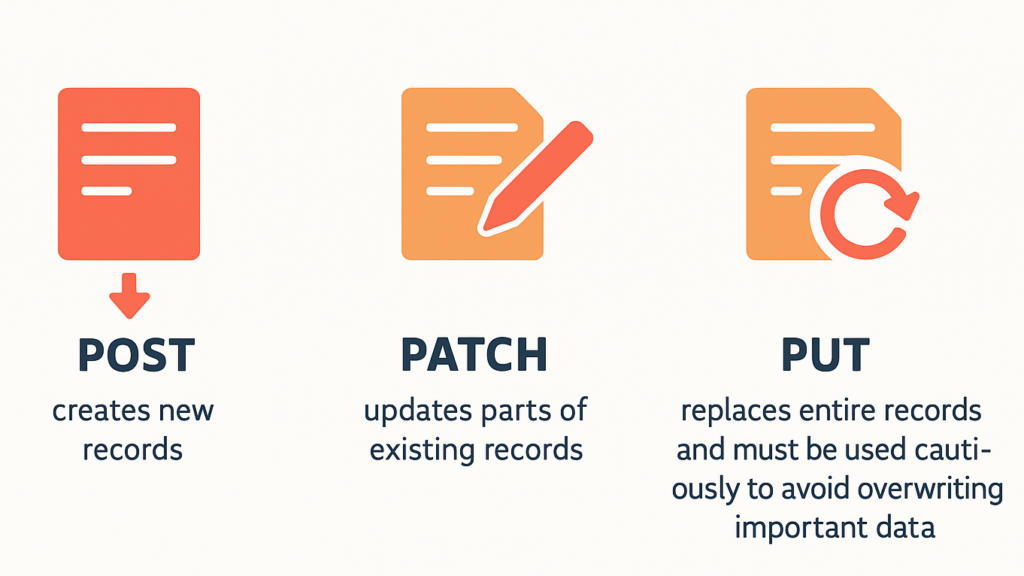
Infographic summarizing the purpose and differences between the POST, PATCH, and PUT HTTP methods.
Proper handling of data types—strings, numbers, arrays, booleans—is critical for API calls. Most modern APIs support automatic typecasting to ensure compatibility and reduce errors.
Practical examples include fetching JSON data from an external system, transforming it via scripting (e.g., JavaScript or Python), and batch updating CRM records with PATCH requests. For instance, a VA could automate syncing project task statuses from Asana to Salesforce CRM in near real-time, enhancing workflow visibility without manual coordination.
Robust error handling—checking API responses for failures, managing rate limits with retry logic using exponential backoff, and validating data before requests—ensures resilience and reliability amid potential network or server issues.
Developing these scripting skills empowers virtual assistants to design powerful, bespoke automations responsive to their clients’ evolving needs, transcending conventional tool limitations.
Following this, we share practical tips, common pitfalls, and workflow optimization hacks for maintaining sustainable automation success.

Prioritizing data security and privacy in virtual assistant automation workflows.
Start small by automating one process at a time to avoid overwhelm and ensure each workflow functions flawlessly before scaling. Thoroughly document every automation with standard operating procedures (SOPs) to facilitate team onboarding and streamline troubleshooting, especially when working with or managing a VA team.
Regularly review automation logs and monitor performance weekly to detect failures quickly and identify areas for refinement. Avoid over-automation that may depersonalize client communication—balance efficiency gains with authentic engagement to maintain strong client relationships.
Stay vigilant about security: use secure API key management practices, avoid hardcoding credentials in scripts, and follow platform-specific best practices for data protection. Always test new automations in sandbox or staging environments before deploying them live to prevent costly errors and client dissatisfaction.
These practices help virtual assistants sustain productivity enhancements while minimizing operational risks, positioning them competitively in the dynamic remote work marketplace.
By strategically integrating advanced workflow automation tools, AI-driven scheduling assistants, and security-conscious best practices, virtual assistants can dramatically elevate their efficiency and client satisfaction—embracing the core freelancer essentials required to thrive in 2026 and beyond. Looking forward, those who master adaptable, scalable automation solutions combined with personalized client engagement will lead in the increasingly competitive freelance ecosystem. The question is not if you will adopt these innovations, but how swiftly and effectively you leverage them to gain a sustainable competitive edge.

